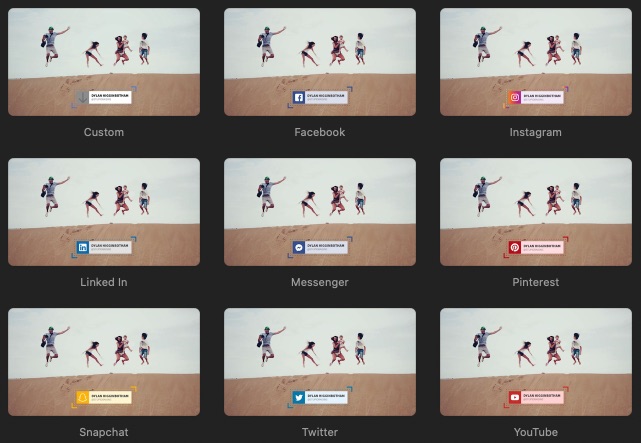
Facebook Lower Third Title
Before you download would you like to sign up for my newsletter? It’s free & you’ll be the first to know about new plugins.
What is this?
I made a couple improvements
How to install it
- Download the file.
- Unzip file.
- Move “Stupid Raisins” folder to Movies>Motion Templates>Titles>Lower Thirds.
- Restart Final Cut Pro X and you’re good to go.
How to use it
In FCPX click on the Title browser. Select Lower Thirds and then scroll down to Stupid Raisins. Drag the title onto your clips and then select the title. You’ll have the following options.

Social Media Lower Third Title Controls
Use the drop down to select the network. If you select Custom you can use a custom icon and change the title bar colors. You can turn the build in/out animations on and off with the checkboxes.
Text doesn’t update in FCPX
Sometimes when you change text you don’t see the changes. That’s because you’re updating one of the other text boxes and it’s “turned off”. Watch this video for more info.
Animations speed changes with duration adjustments
Final Cut King key-framed the animations so if you change the title duration the animations will speed up or slow down. I tried to change it using Motion behaviors but couldn’t get it just right. I did however add markers so the build in/out animations timing won’t change if you adjust the title duration.
If you have any questions or suggestions, please let me know in the comments below.


Hi,
I love your social Lower thirds. However, after downloading went to
movies/motion templates/titles, and you instructed to install the “stupid raisins” folder in Lower thirds, but first, there is no folder after “Titles”, and there is no stupid raisins folder. so after unzipping, I moved all three lower third files to the titles folder, but no matter how many time i restart Final cut, they don’t show anywhere.. any ideas?
Hi Eric. Thanks for your reply. The lower thirds aren’t mine. Final Cut King made them in Motion and then I converted them to FCPX titles.
Go to your Titles folder and create a “Lower Thirds” folder. Now put the Stupid Raisins folder that you unzipped into the new “Lower Thirds” folder. Restart FCPX and you should see them.
Did that work?
I’ve recently isetallnd FCPX and just stumbled upon your blog which I will use as a resource. I’m a teacher in a small independent school and aside from teaching, I put together a video featuring the entire student body staff with video clips and photos taken throughout the year. I would love to have the SquidFX Generator plugin to help showcase my project. Very cool!
I’m glad I could help and I’d love to see the video you made.
I’m not SquidFX but what generator are you talking about?
I downloaded this and once I drag it onto one of my video and tried to change the name it get stucks on finalcutking even tho I can change it in textbox but it wouldn’t change on it visual. even after rending and make move it still says finalcutking?
That’s strange. What version of FCPX are you using?
I figured out what’s happening. You’re changing one of the text boxes for one of the other networks or for custom. Watch this video for more info.
Hi there,
First: thanks for this great title for free. Really appreciate it.
Second: is there a way to handle the white space? I saw the png are transperant. I would like to remove the whitespaces, but I do not know how!
Hi Renzo. Thanks for stopping by. You’re welcome.
Can you send me a screenshot showing what you’re talking about?
I installed as instructed, but I can’t seem to find the navigation arrows in the top left hand corner of the Viewer Window to edit the text as you demonstrated in the video linked in this tutorial. How do I get them to appear? Thanks.
What version of FCPX are you using?
Thanks for the title, it’s beautiful.
You’re welcome. Don’t forget to thank Final Cut King as well!
AWESOME, THANKS SO MUCH!! VERY VERY GENEROUS OF YOU FOR YOUR TIME AND EFFORTS…
MUCH APPRECIATED!!
You’re welcome! Please share any videos you use it in. I’d love to see it in action.