Introducing Subtitle Pop
25 Animated Caption Templates For Final Cut Pro

Exclusively for  Final Cut Pro on
  Apple and Intel CPUs
What's Subtitle Pop?
Subtitle Pop is the answer to your boring, lifeless auto-subtitles.
Final Cut Pro can auto-generate your captions now, which is great, except they show up looking like your uncle made them in PowerPoint. Subtitle Pop takes those exact same auto-subtitles and makes them look like something you'd actually stop scrolling for.
It comes with 25 animated caption styles: word highlights, kinetic pops, typewriter effects, box reveals and more. It's like a whole caption buffet, except every dish is good and nobody made the potato salad with mayo that's been sitting out too long.
Each template works perfectly with FCP's auto-subtitles. No keyframing every single word by hand like it's 2014. Just right click and you're done.
Subtitle Pop is designed for vertical videos (because apparently everyone's watching everything sideways nowadays). But don't worry, they still work with square, 4K and full HD videos
What Can I Do with Subtitle Pop?
With Subtitle Pop, you get the same slick captions everyone else on your feed is using, minus the hours they spent figuring it out.
Subtitle Pop is built for short-form content, TikToks, Reels, Shorts, anything meant to grab attention in the first two seconds. But it works just as well on longer videos too, tutorials, how-to's, vlogs, interviews, podcast clips, talking head videos, product demos, behind-the-scenes content, even client testimonials, anywhere you want captions that hold attention instead of sitting there looking like an afterthought.
Captions aren't just for people watching on mute anymore. When your viewers hear and see the words at the same time, they understand your message faster and they're more likely to stick around instead of drifting off. Subtitle Pop makes that happen automatically, no extra effort required.
So whether you're cutting a 15-second hook or a 15-minute deep dive, Subtitle Pop has a style that fits.
Is Subtitle Pop Easily Customizable?
Kind of, on purpose.
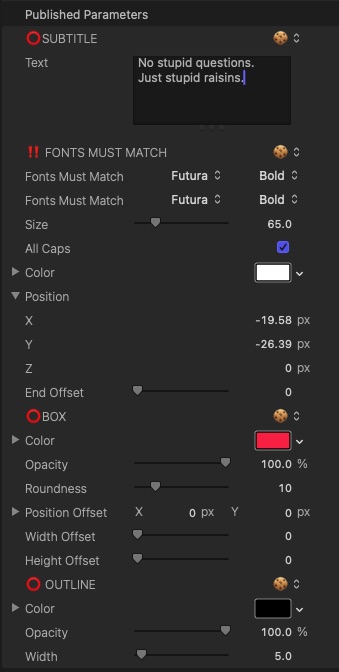
Subtitle Pop isn't built to be endlessly tweakable. It's built to be fast. Every template gives you the essentials like text, font, size, color, highlight color, position, rotation and scale, so you can style a caption in seconds instead of getting lost in fifty sliders you'll never touch.
If you want deep, granular control over every possible parameter, that's not really what this pack is for. If you want your captions to look good right now so you can hit publish, this is exactly what it's for.
Does Subtitle Pop Have a Free Demo?
Yes! The demo version is the full plugin and all 25 templates work in your videos, they'll just come with a watermark.
And don't worry, if you fall for one of the templates and decide to buy later, Stupid Raisins automatically removes the watermark. You won't lose any work, just your excuse to keep procrastinating.
Try it Free User Guide $49 Subscribe & Save!

I love your products! The quality, simplicity of use and stability are the best available.
 Ed Chapman
I love it when I need a quick, easy way to do something and I can find a plugin for #FCPX to do it for me. Thanks @stupidraisins for datapop
 @JohnFlanaganII
@stupidraisins I was able to put that together in just a couple of hours. I DL'd the demo, saw how it worked, and bam! Video. Cheetah fast.
 @stranahan
Easy to install. Easy to use.
Subtitle Pop is delivered through Stupid Raisins. After installing Stupid Raisins, you'll have a demo ready to play with. Once you're hooked, buy the full version right inside Stupid Raisins.
Here's the whole process: right-click the Subtitle Pop template you like and select Make Default Subtitle. Then right-click the audio you want transcribed and select Generate Subtitles. That's it, your captions show up already styled.
Find Subtitle Pop under your Titles, in the category named Subtitle Pop, because we're not going to make you hunt for it.
It works best with FCP 12.3 or newer (that's when Apple added the built-in auto-subtitle feature these templates are designed around). Subtitle Pop will still work on older versions of Final Cut, you just won't have the native auto-subtitle tool to pair it with.
Try it Free User Guide $49 Subscribe & Save!Subtitle Pop User Guide
Buy Subtitle Pop Today
When you purchase Subtitle Pop in Final Cut Pro you get a 30-Day Money Back Guarantee! You've got nothing to lose except your old, boring captions.
Get Subtitle Pop today!
Try it Free User Guide $49 Subscribe & Save!
Get 99 Templates for Free!
($138 value)
Do you want to look professional without wasting time & money trying to learn a new skill? Well, check out some free titles, transitions and effects. You're gonna love 'em! Just click the button below to get 96 professionally designed and animated Final Cut Pro templates for only FREE!
Featured Plugins