Introducing Caption Pop AI
Reusable AI Captions for Final Cut Pro

Exclusively for  Final Cut Pro on
  Apple and Intel CPUs
*Available only in Raisin Hater subscription.
What's Caption Pop AI?
Caption Pop AI creates automatic captions right inside Final Cut Pro in 57 languages including English. Analyze your audio, style your captions and drop them on your timeline. Done!
Whether you're editing YouTube content, social media clips, or Caption Pop AI demos, Caption Pop AI delivers professional results in record time. Customize the look, enjoy accurate AI transcriptions, and work in 57 languages. All without leaving Final Cut Pro.
Setting up a caption style takes time. You gotta select the font, size, color, outline, background, word count, position. Plus you're adjusting all of it every time you start a new project.
Caption Pop's Presets fix that. Build your look once, save it and it's ready in one click from then on. Set up your vertical style for TikToks, Reels and Shorts. Save it and you're done adjusting sliders for forever.
You'll save about 3 minutes every time you caption a video.
Frequently Asked Questions
Q: How do I install Caption Pop AI?
A: You don’t have to! It’s bundled with the Stupid Raisins app. Just launch it in Final Cut Pro via the Extensions menu.
Q: Can I set how many words show up at once?
A: Yes! That feature is available in version 1.1.8. and newer.
Q: Can I edit the captions after they’re auto-generated?
A: Not directly inside Caption Pop AI yet. That’s a feature I’m actively working on. For now, once you add the captions to your Final Cut Pro project, you can edit the text there just like any other title.
Q: Does Caption Pop AI translate languages?
A: Nope—not yet. Caption Pop AI only transcribes. Translation is on my future feature list!
*Available only in Raisin Hater subscription.
What Can I Do with Caption Pop AI?
With Caption Pop AI, you can effortlessly add professional captions to any video directly in Final Cut Pro. Here’s what you can do:
Auto-Generate Captions: Skip the manual process—analyze your audio, and Caption Pop AI will automatically create captions for you, saving loads of time.
Customize Your Captions: Tweak the style, font, color, and placement of your captions to match your brand or style.
Support Multiple Languages: Caption Pop AI transcribes in 57 languages, so you can expand your content’s reach and accessibility.
Enhance Accessibility: Perfect for creating closed captions, making your videos more inclusive and easier to follow.
Boost Engagement: Great for YouTube, social media, tutorials, and demos—captions keep viewers engaged, even with the sound off.
With Caption Pop AI, captions are fast, accurate, and look amazing, all without leaving Final Cut Pro!
Is Caption Pop AI Easily Customizable?
Absolutely! Caption Pop AI makes customization a breeze. You can adjust styles with various fonts, colors, and sizes to perfectly match your brand or aesthetic. Positioning captions is simple, too—just move them to the ideal spot on screen for readability and style.
You’ll have control over word count and number of lines, so each caption fits with your video. Plus, with multi-language support in 57 languages, you can ensure captions look great and are easy to follow for audiences worldwide.
Quick edits are a snap, so you can refine your captions anytime, giving your videos a unique, professional touch that stands out.
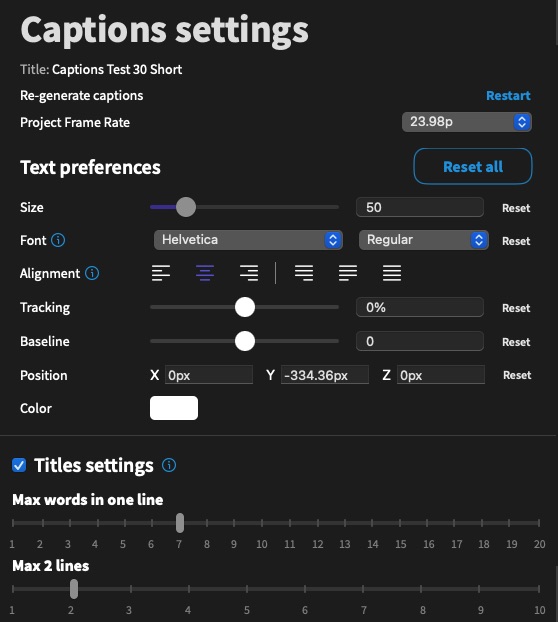
Set It Once. Use It Forever.
Styling captions the same way for every video used to mean redoing the same steps each time. Pick your font, color, outline, background, size, position and more. Presets fix that. Build your look once and save it. Next time, pick your preset and your captions match instantly, no rebuilding from scratch.
It's perfect for editors who run a consistent style across every video or need different setups for different platforms. Create one preset for vertical videos and another for widescreen YouTube.
Presets save real time, every video. Easily save 3 minutes each time you caption.
*Available only in Raisin Hater subscription.
Easy to install. Easy to use.
Caption Pop AI is automatically installed with the totally awesome and free Stupid Raisins app.
After installing Stupid Raisins, you can access Caption Pop AI in Final Cut Pro by clicking on the extension button. You can buy it or use it as a Raisin Hater subscriber.
Caption Pop AI is dead simple to use. First, analyze your project’s audio. Second, customize your captions. Third, copy and paste your captions into your project. All done!
How does Caption Pop AI compare to FCP's built-in subtitles?
Final Cut Pro 12.3 added Generate Subtitles, which can now generate and style subtitles natively, not just closed captions like before. It's a real improvement, and it's free in FCP.
Here's where it still falls short. It only works in English. Caption Pop AI supports 57 languages including English. FCP's styling is basic. You can customize font, size, color, and simple word highlighting and you have to set it up every time.
Caption Pop AI adds outline, background box, position, word control and now presets you can save and reuse across every project. And FCP gives you one style at a time. Caption Pop AI lets you build a library of looks and switch between them in a click.
If you're only ever captioning in English and don't mind restyling by hand each time, FCP's built-in tool covers you. If you want more languages, more control or a style you don't have to rebuild every video, that's Caption Pop AI.
Does Caption Pop AI Have a Free Demo?
Totally! Caption Pop AI is automatically installed with the Stupid Raisins app. Just install Stupid Raisins, restart Final Cut Pro and launch Caption Pop AI with the extensions button.
In trial mode, only the first five captions will export, and the cloud transcription model won’t be available.
What languages does Caption Pop AI support?
Caption Pop AI understands and can transcribe the following languages:
- Afrikaans
- Arabic
- Armenian
- Azerbaijani
- Belarusian
- Bosnian
- Bulgarian
- Catalan
- Chinese
- Croatian
- Czech
- Danish
- Dutch
- English
- Estonian
- Finnish
- French
- Galician
- German
- Greek
- Hebrew
- Hindi
- Hungarian
- Icelandic
- Indonesian
- Italian
- Japanese
- Kannada
- Kazakh
- Korean
- Latvian
- Lithuanian
- Macedonian
- Malay
- Marathi
- Maori
- Nepali
- Norwegian
- Persian
- Polish
- Portuguese
- Romanian
- Russian
- Serbian
- Slovak
- Slovenian
- Spanish
- Swahili
- Swedish
- Tagalog
- Tamil
- Thai
- Turkish
- Ukrainian
- Urdu
- Vietnamese
- Welsh
*Available only in Raisin Hater subscription.

I love your products! The quality, simplicity of use and stability are the best available.
 Ed Chapman
I love it when I need a quick, easy way to do something and I can find a plugin for #FCPX to do it for me. Thanks @stupidraisins for datapop
 @JohnFlanaganII
@stupidraisins I was able to put that together in just a couple of hours. I DL'd the demo, saw how it worked, and bam! Video. Cheetah fast.
 @stranahan
Caption Pop AI User Guide
Buy Caption Pop AI Today
When you purchase Caption Pop AI in Final Cut Pro you will get a 30-Day Money Back Guarantee!
You can unlock Caption Pop AI by purchasing it or becoming a Raisin Hater subscriber.
Get Caption Pop AI today!
*Available only in Raisin Hater subscription.

Get 99 Templates for Free!
($138 value)
Do you want to look professional without wasting time & money trying to learn a new skill? Well, check out some free titles, transitions and effects. You're gonna love 'em! Just click the button below to get 96 professionally designed and animated Final Cut Pro templates for only FREE!
Featured Plugins