Introducing Bubble Pop
25 Bubble Templates For Final Cut Pro

Exclusively for  Final Cut Pro on
  Apple and Intel CPUs
What’s Bubble Pop?
Bubble Pop is a Final Cut Pro plugin that lets you add animated speech and thought bubbles to your videos in seconds. It comes with 25 professionally designed templates across speech, thought, action, and custom styles — so whether your footage is shouting, thinking, or just being dramatic, there's a bubble for that. No keyframes, no confusion, no crying into your timeline at 2 a.m.
What Can I Do with Bubble Pop?
Honestly? Pretty much anything.
Use Bubble Pop in your YouTube videos, vlogs, product reviews, cooking demos, comedy skits, real estate walk-throughs, reaction videos, ads, interviews, or whatever beautiful chaos you’re editing in Final Cut Pro today. If there’s a human (or animal) on screen and they’ve got something to say — Bubble Pop is your new best friend.
Add jokes, thoughts, commentary, sarcasm, fake arguments, passive-aggressive notes, actual dialogue… the list goes on. Think of it as your personal cartoon voiceover department, minus the payroll.
Is Bubble Pop Easily Customizable?
Yes! Ridiculously so.
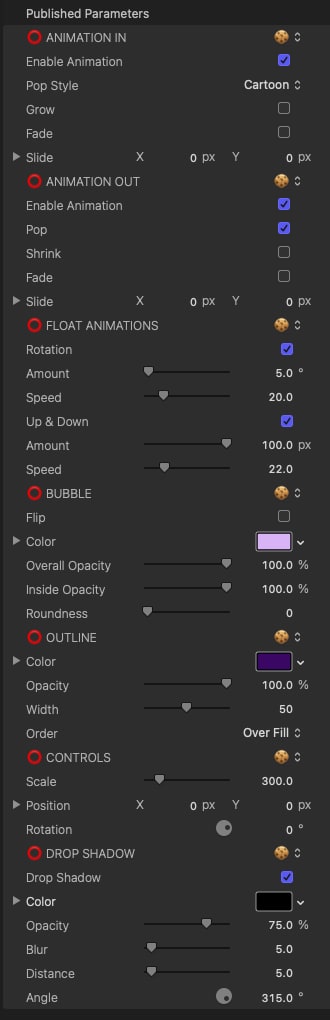
Just drag and drop a bubble onto your timeline, then use on-screen controls to move it, resize it, or spin it around like it’s having an existential crisis. Customize the text, font, color, and animation with a few clicks. Want it to float gently across the screen? You got it. Want to change the bubble shape, roundness, opacity, or outline thickness? Also yes.
There’s even a custom bubble template if you want to get wild and design your own weird little bubble from scratch. Do you need that much control? Maybe not. But do you deserve it? Absolutely.
Does Bubble Pop Have a Free Demo?
Yup! You can try Bubble Pop for free using the Stupid Raisins app.
The demo gives you full access to everything — all the features, all the customization — with just a small watermark as a gentle reminder that free things still have strings. If you decide to upgrade, your existing edits stay exactly the same… just watermark-free.
Zero risk. High reward. Extremely bubbly.
Try it Free User Guide $49 Subscribe & Save!

I love your products! The quality, simplicity of use and stability are the best available.
 Ed Chapman
I love it when I need a quick, easy way to do something and I can find a plugin for #FCPX to do it for me. Thanks @stupidraisins for datapop
 @JohnFlanaganII
@stupidraisins I was able to put that together in just a couple of hours. I DL'd the demo, saw how it worked, and bam! Video. Cheetah fast.
 @stranahan
Easy to install. Easy to use.
Using Bubble Pop in Final Cut Pro is basically foolproof — and we say that as people who proudly named our company Stupid Raisins.
Just install it using the Stupid Raisins app, restart Final Cut Pro, and look under Titles. Drag a bubble into your timeline, click the text to edit, then tweak the animations, colors, and float settings until your scene is full of beautifully unnecessary dialogue.
No keyframes. No headaches. No advanced degrees in timeline engineering required.
Try it Free User Guide $49 Subscribe & Save!Bubble Pop User Guide
Buy Bubble Pop Today
If your video has people in it, they probably have something to say. Or at least you have something to make them say.
Bubble Pop is a Final Cut Pro plugin that gives your videos voice, style, and just the right amount of ridiculous. Try the free demo, or grab the full version and start bubbling like a pro.
And yes — there's a 30-day money-back guarantee. So the only real risk here is getting addicted to talking bubbles.
Happy editing. 🎈
Try it Free User Guide $49 Subscribe & Save!
Get 99 Templates for Free!
($138 value)
Do you want to look professional without wasting time & money trying to learn a new skill? Well, check out some free titles, transitions and effects. You're gonna love 'em! Just click the button below to get 96 professionally designed and animated Final Cut Pro templates for only FREE!
Featured Plugins